Just wanted to take this occasion to share a workout tip I have been using for about a year now which lets me keep things fresh. I love to do this on months with 31 days, and since July and August both have 31, this is a chance to do this for consecutive months.
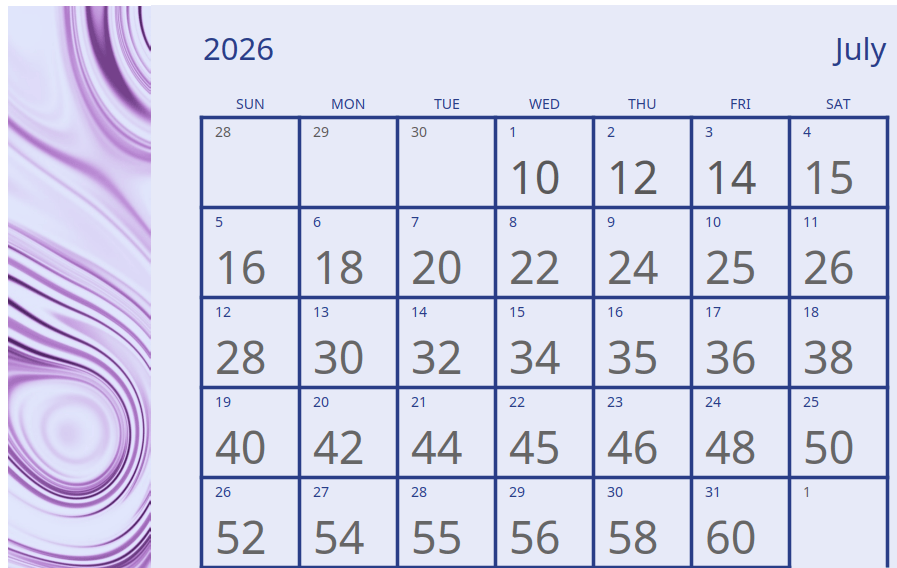
I like to take a movement and progressively add to how many I do each day of the month. It is tough to explain the progression, so here is a calendar for the month of July that shows how many to do.
For example, I’ll do 10 burpees on the 1st, 12 on the 2nd, etc. By the final day I’ll do 60. This is not in lieu of normal workouts, just an extra layer. In the beginning of the month, it is a nice little invigoration. By the last week or so it can become a slog, especially when also getting in 8000-10000 steps a day. Since this is in addition to your regular workout, you can spread it over the entire day. In May I forgot to do burpees one day when it was 22, so I just did 46 the following one. It isn’t that serious.
Burpees are my go-to workout for this, so I think I’ll do that again for July. I know there are many ways to do burpees, but my preferred way is an eight-count like this.
Drop into a squat with hands on the floor
Kick legs out behind you into a plank
Down portion of a push-up
Up portion of a push-up
Bring legs back under you into squat position
Stand back up
First half of a jumping jack
Second half of a jumping jack
For August, I’ll probably do explosive squats. Depending on your fitness level, you can choose any workout for this. Some suggestions:
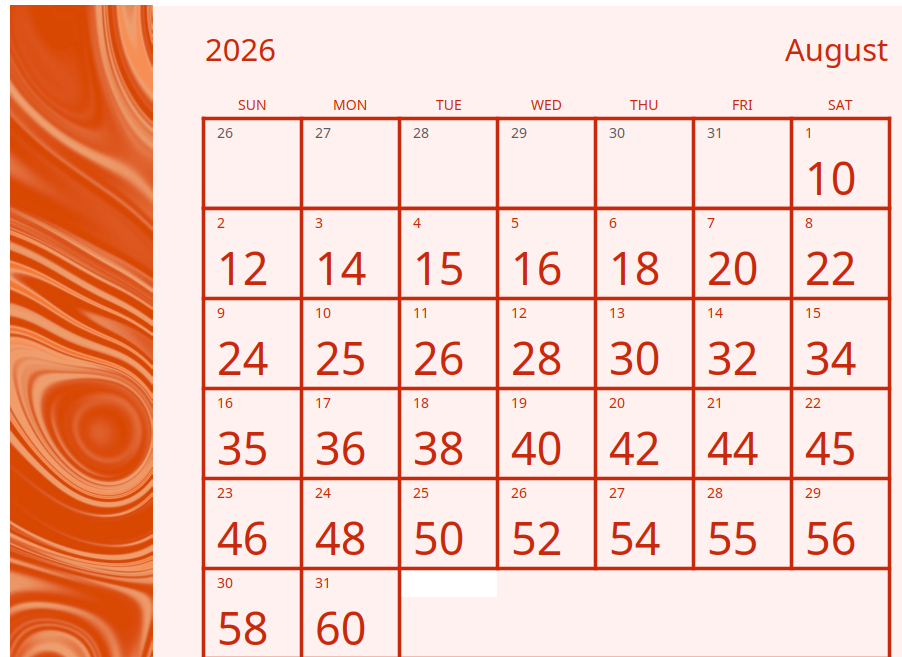
Here is a calendar for August as well. Give ’em hell!
If this doesn’t float your boat I have one more thing to consider. I am not a Crossfit person, but I recently got into a specific Crossfit named workout called Cindy. It consists of 5 pull-ups, 10 push-ups, and 15 air squats. I know Crossfit people do those weird looking pull-ups, but you can do regular pull-ups for this instead. You do those exercises in order for one round. A full Cindy is as many rounds as possible (AMRAP) in twenty minutes. A great full body workout in a short time with no equipment needed other than pull-up bars.
If that also does not float your boat, maybe you should stay on dry land.
As those of you who are frequent readers of this blog already know (both of you), I am a proponent and aficionado of free, public, outdoor fitness areas. I cannot pass up an opportunity to highlight the area around ACC Highland because it not only includes two such locations but also a short trail that dovetails into a longer trail for anyone interested. There is a lot in the area for anyone looking for a nice quick workout or hike during a lunch break or lazy weekend morning.
ACC Highland is one of the campuses of Austin Community College. This particular one is housed in what used to be Highland Mall. The region used to be one of the higher parts of the city so there are a lot of place and street names that play on it. Crestview neighborhood, Twin Crest and Eastcrest Drives nearby. Highland Mall opened in 1971 and served the community for over forty years before closing in 2015. From there the building was scooped up by ACC and transformed into the shiny collegiate location of today.
With as overwhelmingly hot as it gets in Austin pretty much all the time between March and November, you really need to fumble the bag to screw up an air conditioned, indoor shopping mall. That place should have printed money forever and ever.
Shockingly, racism was one of the big reasons it failed. Highland Mall was in a … what’s the euphemism … “racially diverse” part of Austin and somehow hated the fact that people other than rich whites wanted to shop there. During the Texas Relays (a yearly event around Easter that brings together the best amateur and professional track and field athletes in the state) even more, uh … “urban” youth wanted to shop there. And the pearl clutching began in earnest. Highland Mall faded into irrelevance years before the doors closed for good.
ACC Highland is shiny and new and all that stuff. A different kind of blog would continue to talk about how great the interior looks and all the wonderful things you can do there. This is not that kind of blog; we are staying outside.
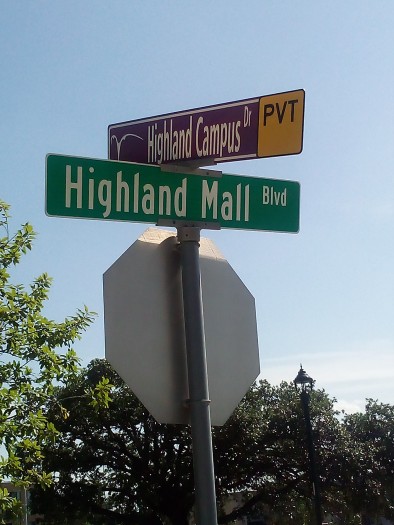
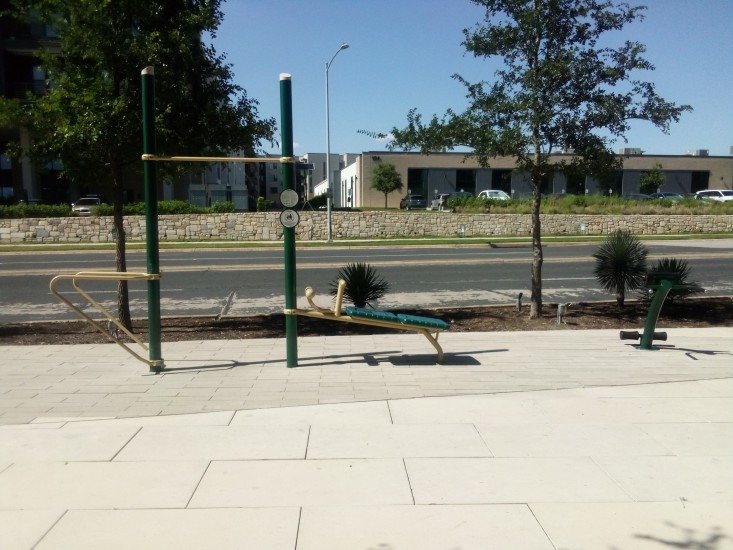
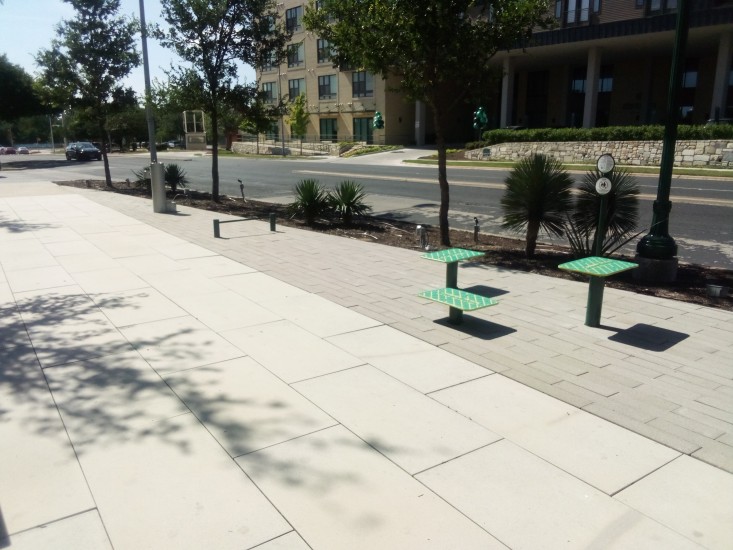
We begin on campus about a block from Airport Boulevard at the corner of Highland Mall Boulevard and Highland Campus Drive. So named in case you ever happen to forget that you are near ACC Highland for some reason. Here in front of a new apartment building complex is the first outdoor fitness station. This one is robust and includes pullup bars, step platforms of varying heights, dip station, pushup bar, an ab exercise spot, and a lower back extension. I can also proudly report that the water fountain works as well.
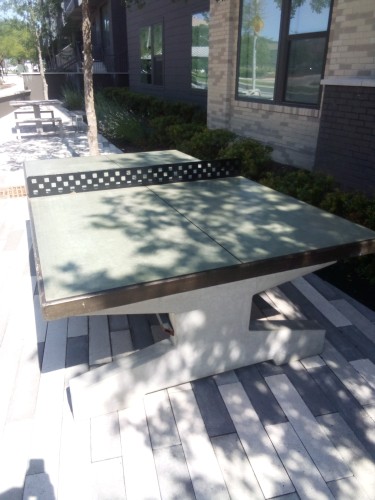
If you are looking for something else to do at this location instead of workout, there is also an outdoor ping pong table. Unlock your inner Marty Supreme if you dare to bring paddles and a ball.
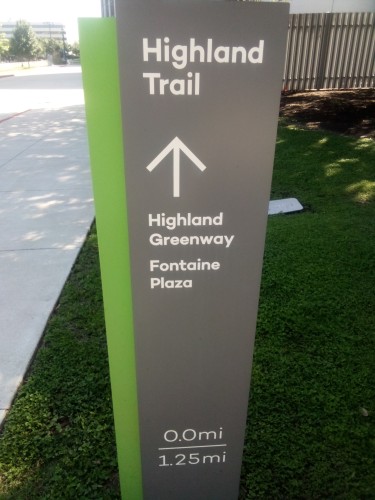
A couple blocks east along Highland Mall Blvd you’ll reach the beginning of the 1.25 mile Highland Trail. It goes roughly along the perimeter of the ACC Highland footprint. It goes along behind some buildings and passes by a large and open parking lot.
The parking lot looks like it would be a great place to get sprinting work in. I used to do a lot of sprinting way back before I became old and decrepit. My go-to sprint workout didn’t have a cool name but it always got me tuckered out. All you need to do it is a large open spot (like a parking lot or soccer field) and a way to roughly measure off distances. Go as hard as you can and try not to rest more than a couple minutes between any two sprints.
1/4 to 1/2 mile warmup
ten 100-yard sprints
eight 80-yard sprints
six 60-yard sprints
four 40-yard sprints
1/4 to 1/2 mile cooldown
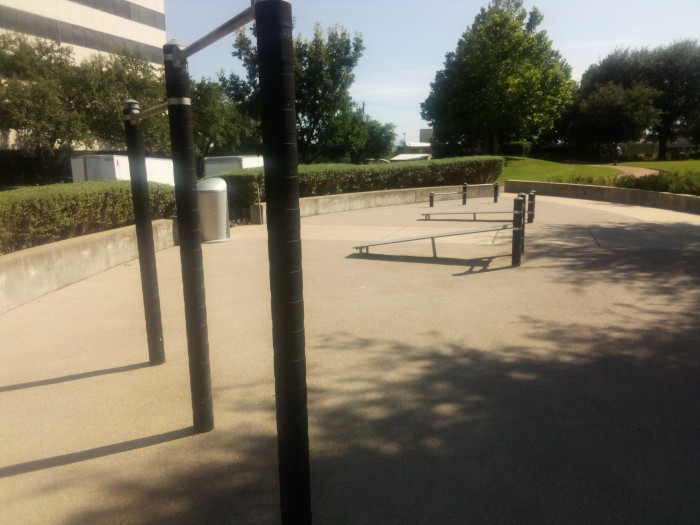
Just past the parking lot is the second outdoor fitness station. This one is older and has fewer spots in which to workout. It has some pullup bars and pushup bars with a couple of inclined benches for abdominal work. The water fountain here works too. However, I also need to mention that there is zero shade over either fitness area so don’t even think about using them this time of year except for right after dawn or before sunset.
Highland Trail continues behind another apartment complex (you see, nothing gets built in Austin except apartment buildings and things owned by Elon Musk and the occasional restaurant) and meets up with the Red Line Parkway along Airport Boulevard. The Red Line Parkway is still in development but it is hoped to ultimately become a 32 mile stretch going all the way from Leander to downtown Austin. Anyone in the local area that is interested in hearing more should come to the State of the Parkway presentation at the Central Library on August 26th. Tell them Gene sent you.
Eventually you come upon Fontaine Plaza on Airport. It is like a super miniature version of Central Park. The plaza and the street that runs next to it are both named for Jacob Fontaine. He was a former slave who became an influential pastor, merchant, and journalist in Austin during Reconstruction. He also played a large part in helping to get UT established in Austin. Hook ’em.
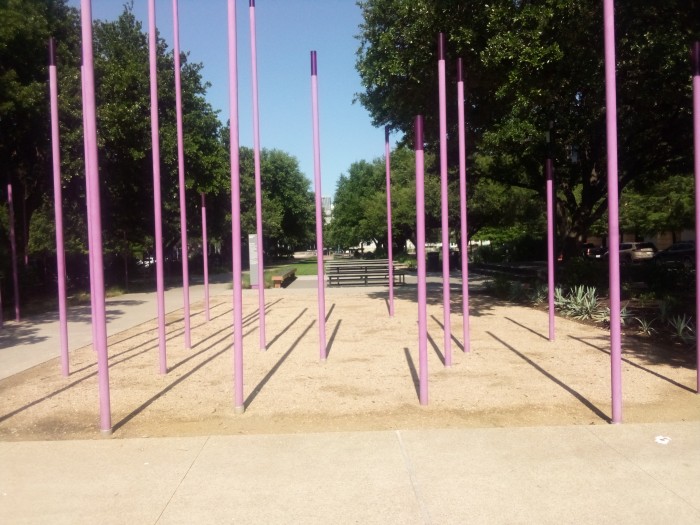
Those purple poles on the plaza are part of a light art project that is supposed to resemble bats in flight. I should mention here for those of you that are unaware, ACC teams are called the Riverbats in honor of the bats that live downtown.
From Fontaine Plaza you can walk a short distance back to the first fitness station or complete the 1.25 mile loop of Highland Trail. Like I said at the start, this is a great area to kill an hour or so and get a good sweat on. You really don’t need to bring anything with you except a desire to explore. And your house keys, don’t forget those or you’ll have trouble getting inside when you get home.
I’ve made a real commitment to walking everywhere I possibly can to improve my endurance. In order to quantify how successful I am being I decided to download a pedometer app to count my steps. I was originally counting them without an app, but I started looking stupid whispering my current number every place I went. Therefore I deigned to test several pedometer apps and post reviews of them here.
When looking for a pedometer I had a few hard and fast rules in mind for what I had to have:
The pedometer had to be free. I was willing to accept some small, constant ads or infrequent, large ads in exchange for keeping my wallet closed.
It had to work on an Android device. It is possible that the world’s greatest free pedometer app is on the iPhone (it’s not). If so, wouldn’t do me any good because I couldn’t download it.
It had to specifically work on the Android 9.0 version. I know this is not the latest and greatest, but I am not upgrading my phone just for a step counting app. I downloaded a few apps that I couldn’t get to work and I think that compatibility might have been the reason.
It had to work using only my physical activity data. That is the only permission anything was allowed to have. I was not giving my location data to any rando that uploads an app to the Play Store. I know for a fact that some apps I tried would not work correctly because I would not pony up my location and/or biometric data.
Other than those above, I just wanted an app that could count steps accurately and generally leave me alone 95% of the time unless I wanted to see my daily step number. As I downloaded these apps to test them I immediately noticed one annoyance. All of these apps had names so similar it was nearly impossible to differentiate them. For that reason I will include the name, developer, and Play Store link for each app I discuss so there is minimal confusion.
Without further ado, here are my thoughts on six different pedometer apps.
This app requested my age, gender, height, and weight. It had an adjustable step length and the most accurate setting I could get showed 104 steps in the app for every 100 steps I actually took. There were a fair amount of full screen ads, and most of them were the annoying kind of ad like “oh no, you just downloaded a virus” that try to scare you into clicking on it instead of telling you about a product or service that may interest you. There was also a constant small banner ad on the bottom of the screen. It would have cost $11 / year to remove all the ads.
This app made it easy to set custom daily and weekly goals and it counted calories as well as steps (provided you entered your gender and weight info). It also allowed me to see my daily step total right from the lock screen without having to unlock my phone. One cool feature with this app was that it included a lot of HIIT mini-workouts of 2-5 minutes for when you are in a hurry. For example, there was a 2 minute chest workout you could pull up that cycled through different easy chest exercises like wall pushups that could be done at home or in a hotel or wherever.
A very solid app that did lots of things I liked. The only real drawback here was the scary ads that were a little too frequent but the bonus mini-workouts were a solid bonus. Four out of five stars.
This app requested my age, gender, and weight. It had an adjustable step length and the most accurate setting I could get showed 105 steps in the app for every 100 steps I actually took. The ads were largely TikTok ads that you could skip through after it played for 5-10 seconds. There was no premium or ad-free version that I could see.
The app let you customize theme and colors in a bajillion ways. I never gave that a second thought because I don’t want that sort of feature. It also counted not just steps but also calories, distance, and time walked. The big negative was the battery draw the app required to work. When you downloaded it there was a warning page about how quickly it drains your battery. And then while I used it I noticed my battery getting sucked dry in real time. It had a sleep mode you could use to minimize that, but then you needed to remember to un-sleep the app every time you went somewhere in order for those steps to get counted.
While accurate, this app lacked the ability to see your steps directly on the lock screen. That is the second most important feature I found across all the apps. The huge inefficiencies in battery life also made this a less than ideal app. Two out of five stars.
This app requested my age, gender, and weight. It had an adjustable step length and the most accurate setting I could get showed 105 steps in the app for every 100 steps I actually took. There were banner ads at the bottom of the screen as well as full screen unskippable ads, and also ads where the X to close it would be purposely hidden to make you unlikely to close the ad without accidentally clicking on it and opening the sponsor’s website. Their Pro plan with no ads cost $30 / year.
The app counted steps and calories and showed them straight from the lock screen. Which was great because this app took an exceedingly long time to load. Not counting the extra time it took for the ads to get out of the way. It included a sleep logger so you could enter how much sleep you were getting and an AI “Health Pal” that I am not really sure what its actual use was. It absolutely was not able to help me with my property tax questions though.
Ultimately the long load times and nefarious ads undercut the other quality features of this app. Two and a half out of five stars.
This app requested my age, gender, and weight. It had no way to adjust my step length. That was really unfortunate because this counter registered 80 steps for every 100 steps I took. It didn’t matter if I said I was 5′ tall or 7′ tall it never got any more accurate than that. It also had a serious lag on counting steps. Like, I could walk from one end of a block to the other and the number wouldn’t change. Then after I stopped it would slowly count up until it got everything counted.
The app itself was very minimalist and bare bones, which I liked because there was no fluff and no battery overuse. It also had very minimal ads to the point that I cannot even remember any negatives from that perspective. The one thing this app would not shut up about was wanting me to go online. It constantly asked me to join a chat group and message my friends — about how much fun it is to walk, I guess.
One cool feature was that it had “bots” that race you throughout the day. For example, if your goal is 6000 steps there is a bot that slowly counts up to 6000 during the day and a leaderboard with you and another lazy bot that goes almost nowhere, and a busy bot that exceeds your daily goals to motivate you.
I liked the “bots” idea and the minimalist design. However, the most important feature for me is accuracy and counting only 80 steps per 100 I take was a major negative. Three out of five stars.
Before I continue with more reviews I need to talk about two things that I saw in almost every app I tested which annoyed the shit out of me. One, so many of them counted my weight in tenths of a pound. Why do this? Who accurately keeps track of their weight to the tenth of a pound? This is the same sort of meaningless hyper-accuracy as you see in rainfall totals to the hundredth of an inch.
Two, nearly every app I downloaded served me ad upon ad for other pedometer apps. Wait, what? Why does one step counter app try to pitch me a different step counter app? Do they think I need to run two pedometer apps simultaneously? Don’t they realize they are supposed to compete for my business? It makes as much sense to me as if I bought a six pack of Pepsi and inside there was a coupon for a free Coke.
This app requested my age, gender, and weight. It had no way to adjust my step length. Despite that fact this app was so accurate it counted 99 steps for every 100 steps I took. This was easily the most accurate of all the apps I tried. Weirdly, this was also the only app that counted in discrete intervals of 9 steps. Every other app I used would count individual steps and I could conceivably end on any number on any day. 4512, sure. 5398, absolutely. But this app only counted in increments of 9. If I started walking I had to go 9 steps before it would count all 9 at the same time. While this annoyed the ever living shit out of me at the beginning, I wound up accepting it since the app was so damn accurate.
This app had a banner ad on the top and video ads for Temu on startup. It had a premium plan that removed the ads for $5.49 / month. There were lots of notifications, if you didn’t turn them off it could get excessive. The app also showed your steps and calories on the lock screen.
In spite of the weird counting method and overzealous notifications, the fact that it was amazingly accurate and let me see my steps from my lock screen more than made up for it. Four out of five stars.
This app requested my age, gender, height, and weight. It also had minimal ads with a premium option without ads for $19.99 / year. However none of that mattered at all.
This app had adjustable step length but I was not able to dial it in anywhere close to my walking stride. No matter what height I used, no matter what step length I used, it remained wildly far off from my actual steps. The closest I could get it was 220 steps registered for every 100 steps I took. I wasted an entire afternoon just walking back and forth in my apartment parking lot trying every possible setting to get it sort of close to almost accurate-ish. Never got anywhere close. One out of five stars.
Those are my reviews of the six different free pedometer apps for Android 9.0 and earlier devices that I happened to try. I valued accuracy and lock screen step visibility more than anything else, then intrusiveness of ads and battery usage. Least important to me were customization of colors and themes and online features or anything that tried to create the feeling of a “team”. If those sorts of things are important to you, you’ll probably rate these apps differently.
Even though I had two apps both finish with four stars, the one I decided to continue using was Pedometer King because of those most important features. I reserve the right to delete this app if it starts serving too many ads or gets annoying in some other way.
I have not yet addressed my current level of physical fitness. When you are trying to do something like walk over uneven, unimproved ground for over 2000 miles during the summer your level of fitness is an important consideration. While I hope my fitness improves between now and March 2027, I want to take stock of exactly where I am as a starting point.
I know I said in my last entry that I shared some physical traits with The Rock and Dave Bautista. That was a joke, or more accurately a bald-faced lie. I am in decent enough shape to not have any debilitating illnesses or anything of the like. I have two working legs and two working arms and I’m pretty sure my pancreas is functional.
I was in the Army for 22 years, mostly in the Reserves. In that time I never failed an APFT (Army Physical Fitness Test) and actually got the maximum score of 300 once. Most of my tests I scored somewhere between 250-290 and got the PT patch basically every time I took the test between 2010-2017. I retired almost two years ago, so I took the new ACFT (Army Combat Fitness Test) only a couple of times for record. Each time I took it I did just enough to meet the minimum standard and coasted. Except for Spring-Drag-Carry (SDC). That was a fun event.
In my opinion, the entire ACFT should be just the SDC. You should have to do it, rest 10 minutes, do it, rest 10 minutes, and do it again. Your slowest time of the three is the one that counts and needs to beat the minimum time to pass.
I ran a marathon way back in 2009. I ran it in under four hours, which is nothing to write home about but when I originally wrote this sentence I said “I came in under four hours” which makes me sound like I’m trying to impress Charles Dera or Keiran Lee. I have run four half marathons and too many 10K road races to count. Most of those were in my 20s and 30s. The last long race I did was the Navy 10 Miler Afterburner Challenge in Fort Worth, TX in 2022. That race had a five miler you did at 0700 and then a 10 miler at 0830. They gave you three medals for completing it.
I read somewhere once that age 45 is the most difficult as far as how much and how fast your body and fitness decline. For me that was definitely true. I run three times a week every week. For the last five years I have cut my daily miles from roughly 6-6.5 down to 4-5 just because of how much longer it takes me to run now. I can still run for distance at a slower pace, but I have lost my ability to go into “turbo mode” when I want to pass other people like I could a decade ago.
Hiking is more like rucking than like running though. I have obviously done ruck marches in the Army. Most of them at a brisk pace with 30-40 pounds on my back. Also, most of them when I had much less gray in my hair. I did the Norwegian Foot March (NFM) in Evansville, IN back in 2017 and trained for it by rucking around various parts of Austin. The day I did the NFM is actually a good story so I won’t waste it here when I can squeeze a post out of it later.
As far as weight training, I used to be a member of a gym up until Covid. You may have heard of Covid before. Since Covid I gave up on gyms and have trained at home with bodyweight exercises and free weights. I have also been fortunate enough to live near parks that have pull-up bars and similar equipment. Since it is so warm in Austin there are only a couple months a year that it is not feasible to train outdoors. I am thinking about joining a gym later this year so I can be able to concentrate on things like squats and deadlifts that it is not possible to replicate without giant barbells with giant weights on them.
So that’s where I am right now. I am realizing that this blog is slowly becoming me talking about my past and not doing anything. I promise I will actually do something for my next post.